Blog
React Native with zero knowledge — how I use AI, rules, and skills to build from scratch
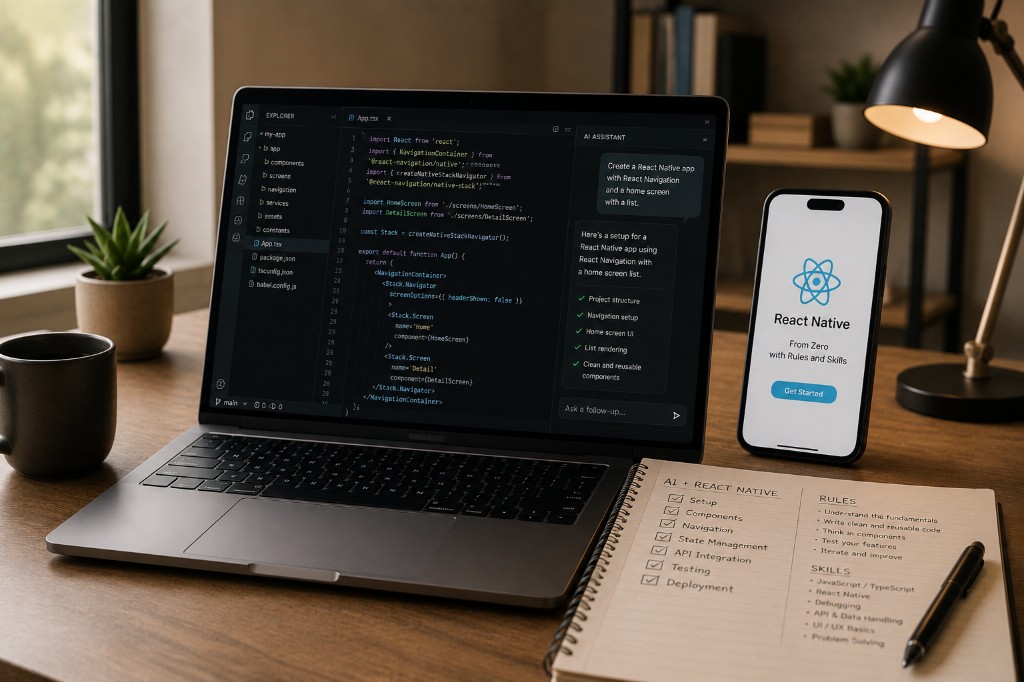
For Framework7 and Cordova devs learning React Native with Cursor — read the codebase first, write rules, and ship with human review before release.
I'm not going to pretend I was a React Native expert first and AI second. My production years are Framework7, Cordova, PHP, and getting apps through the stores on live mobile platforms — see my work and about page for the full picture. React Native is new to me — and this portfolio (Next.js/React) is part of how I'm learning web React with AI beside me.
Who this is for: mobile developers (especially hybrid/Cordova) starting React Native at zero — and anyone using Cursor who doesn't want a 2,000-line diff they didn't read.
That setup is exactly why I wanted to write this: if you're starting at zero on a stack, AI can help you ship — but only if you know how to read the code, write instructions, and set rules so the tool doesn't run away from you. I offer this as a service too — see AI engineer for workflow setup and production review.
A real session (what “zero” looked like)
First time I scaffolded a small RN module with AI, the diff looked great — navigation wired, screen files in place, types everywhere. Then I ran it: the stack navigator import didn't match what Expo actually shipped in that template. Nothing crashed loudly; the screen just never registered. I spent twenty minutes tracing imports instead of blaming the tool. That's the job — AI compresses setup; you still own whether it runs on a device.
What "zero knowledge" actually means
Zero doesn't mean you know nothing about software. I already know mobile flows, backends, release checklists, and what breaks in production. Zero means I don't have muscle memory in React Native yet — navigation patterns, native modules, Metro, the folder conventions, the errors that look scary until you've seen them twice.
AI fills gaps fast. It does not replace knowing what you shipped.
Step 1 — Read the whole project before you ask for features
The biggest mistake I see (and I've done it): open Cursor, type "build me a ride app," and hope.
Instead:
- Clone or scaffold the smallest real project you can — even an empty Expo app.
- Walk the tree —
app/orsrc/, where screens live, where API calls go, where types sit. - Run it on a device or simulator. Break it once on purpose so you know what failure looks like.
- Ask AI to explain, not to rewrite: "What does this navigation file do? What calls this API hook?"
You're building a map. AI answers are useful only when you know which room you're standing in.
For this portfolio repo, the same rule applies: I read src/app, src/components, and content/ before adding service pages or blog routes. If you can't trace a URL to a file, you shouldn't merge the PR.
Step 2 — Rules: the guardrails in .cursor/rules or project docs
Rules are always-on instructions for the AI in your repo. Think of them as house rules:
- Stack we use (Expo, TypeScript, no class components)
- File naming (
PascalCasecomponents, colocated tests if any) - Things we never do (
anywithout a comment, secrets in code) - Voice and scope (minimal diff, match existing patterns)
Good rules are short and enforceable. Bad rules are a 40-page essay nobody follows.
Examples that work for a React Native learner:
- Match existing navigation library; do not add a second one.
- Prefer functional components and hooks.
- No new dependencies without asking.
- Mobile-first; test layout on small screen sizes.
- Production apps get manual review before release — AI output is draft until reviewed.
Rules protect you when you're tired and tempted to accept a huge AI diff you didn't read.
Step 3 — Skills: situational playbooks
Skills (in Cursor or Claude projects) are deeper guides for a type of task — like "frontend-design" for UI or a custom skill for "React Native screen + API integration."
Use a skill when:
- You're about to repeat a workflow (new screen, new API route, new service page)
- You want consistent quality (accessibility, typography, error states)
- You're learning a stack and need a checklist
For React Native from zero, I'd write a skill that says:
- Screen structure (loading, empty, error, success)
- Where types live
- How we call the backend
- How we test on device
- What to check before calling it "done"
Skills are not magic. They're saved senior-developer reminders you paste into context when the task fits.
Step 4 — Instructions per task (the prompt that matters)
Rules and skills set the stage. Instructions win the scene.
A weak prompt:
Make a login screen
A useful prompt:
Add a login screen to the existing Expo app. Use the same Button component as ProfileScreen. Email + password, call
POST /auth/loginfromsrc/api/auth.ts. Show inline errors. No new libraries. Match spacing inProfileScreen.tsx.
Notice: references real files, limits scope, forbids random deps.
When I'm learning React Native, I phrase prompts as:
- "Explain this file line by line, then suggest one improvement."
- "Add feature X following the pattern in file Y."
- "Diff only — no refactor of unrelated files."
That last line saves hours.
Step 5 — Build from scratch in layers, not in one shot
AI can generate a whole app skeleton. Production apps grow in layers:
| Layer | What you verify |
|---|---|
| Navigation shell | Can you move between empty screens? |
| One real screen | Data loads, errors show, loading state exists |
| API integration | Auth, tokens, env vars not committed |
| Store / persistence | Only if you need it — don't add early |
| Polish | Animations last, not first |
I use the same layer cake on PHP mobile backends: process flow first, pretty UI later.
For React Native specifically: get one screen + one API call + one error path working before theming the entire app.
Step 6 — Read the AI output like a code reviewer, not a fan
I'm a senior mobile developer; I still read every diff when the stack is new to me.
Checklist before I accept AI code:
- Imports — did it pull in a library we banned?
- Secrets — anything hardcoded?
- Types —
anyeverywhere or real shapes? - Navigation — registered routes match files?
- Side effects — fetch in render? missing cleanup?
- My project's patterns — does it look like our code or generic tutorial code?
If I can't explain a block to another dev, I don't ship it.
Step 7 — AI speed, my sign-off (production)
This is the part clients care about.
AI makes it possible to go from zero React Native knowledge to a working prototype faster than textbooks alone. It does not remove accountability for:
- Security review
- Store guidelines
- Backend contracts
- Regression on existing features
On production mobile I ship Framework7/Cordova with the same discipline: fast drafts, careful release. React Native learning gets the same rule.
What I'd tell another developer starting cold
- Read first, prompt second.
- Write rules before you generate thousands of lines.
- Use skills for repeatable workflows — blog posts, screens, API modules.
- One feature per session — small diffs, easy review.
- Run on device often — simulators lie sometimes.
- Be honest on your portfolio — "learning through real projects" beats claiming expert status.
Where I'm applying this now
- This portfolio — Next.js/React work, AI-assisted, human-reviewed before push.
- AI workflow — AI engineer services for rules, skills, and production review.
- React Native — studying through small real modules, not tutorial clones.
- Production mobile — still Framework7/Cordova for mobile app development; new stacks earn trust through review, not hype.
- Web hiring — AI web developer vs traditional for clients comparing delivery models.
If you're starting React Native at zero with AI: you're not cheating. You're compressing learning time — as long as you still learn the codebase and still own the release.
Belief I'll stand on: AI is a faster first draft, not a shorter accountability loop.
Questions? Get in touch — happy to talk shop about mobile, AI workflow, or how to structure rules for your repo.